This repo assembles PostHog context for AI agents and LLMs into Agent Skills-compliant packages. Check out /context for details.
Need output in a different format? No problem. Let us know in #team-docs-and-wizard, or fire up a PR to augment the /context and /scripts directories with your preferred transformation.
Have a skill you want to make sure is maintained and distributed via the wizard?
We'd love your pull request!
The context mill gathers up-to-date content from multiple sources, packaging PostHog developer docs, prompts, and working example code into a versioned manifest which can be shipped anywhere as a zip file.
The PostHog MCP server currently fetches the examples repo manifest and exposes it to any MCP-compatible client as resources and slash commands. This is what currently powers the PostHog wizard.
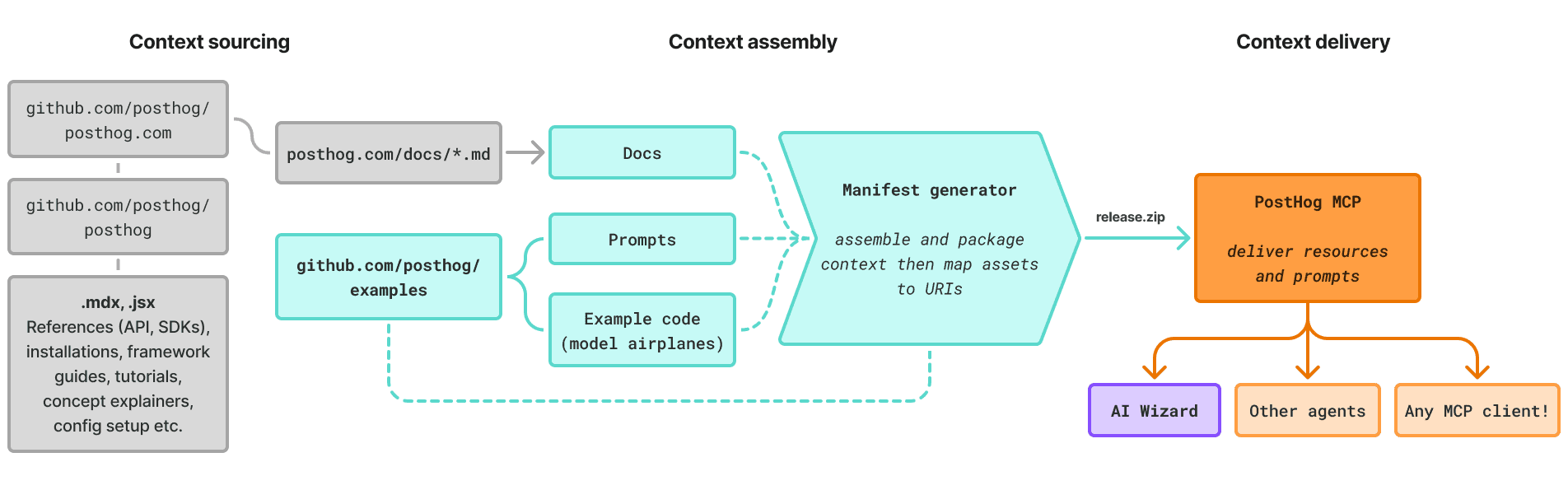
The examples repo effectively acts as a context engine, an assembly line for turning disparate PostHog knowledge into something portable, something AI systems can reliably consume.
You can break its context engineering flow into three main stages.
1. Context sourcing: The examples repo pulls from the entire PostHog developer docs, with pages delivered from posthog.com as raw Markdown. It also includes curated, hand-crafted prompts and working example apps.
2. Context assembly: The examples repo transforms and packages the sourced context into a zip file manifest, which is meant to be portable and self-contained. We can structure and shape the manifest however we need.
3. Context delivery: The examples repo creates a versioned release for the manifest, which can be consumed by any agent or MCP server as a skill or resource.
We've got live, working example code that demonstrates PostHog in action. You can run these yourself to see events flow into your PostHog project.
These are more like model airplanes. They're dramatically simplified to make it easy to see PostHog in action. You shouldn't use these as starter projects or put them into production. The authentication is fake!
But the leanness makes these useful for agent-driven development. Use these as context to help your agent make better integration decisions about PostHog.
examples/
├── basics/
│   ├── next-app-router/         # Next.js 15 with App Router
│   ├── next-pages-router/       # Next.js 15 with Pages Router
│   ├── react-react-router/      # React with React Router
│   ├── react-tanstack-router-file-based/   # React with TanStack Router (file-based)
│   ├── react-tanstack-router-code-based/   # React with TanStack Router (code-based)
│   ├── tanstack-start/          # TanStack Start
│   └── django/                  # Django
├── mcp-commands/                # MCP command prompts (`/command` in agents)
└── scripts/                     # Build scripts
This repository serves as the single source of truth for PostHog integration resources accessed via the PostHog MCP server.
Run npm run build:docs to generate:
| Output | Description |
|---|---|
dist/*.md |
Example projects converted to markdown |
dist/manifest.json |
Resource URIs and metadata |
dist/examples-mcp-resources.zip |
Complete archive for MCP server |
The manifest defines:
- Skills: Bundled skill packages, each containing a
SKILL.md,references/step files, and any docs/example content - Docs: PostHog documentation URLs (fetched at runtime)
- Prompts: MCP command prompts with template variable substitution
- Templates: Resource templates for parameterized access (e.g.,
posthog://examples/{framework})
Skill step files: Add numbered markdown files to context/skills/<skill>/references/ following the convention <n>-<name>.md with next_step: frontmatter pointing to the next file.
Examples: Add new example projects to basics/ and configure in scripts/build-examples-mcp-resources.js
Prompts: Add JSON files to mcp-commands/
The build script automatically discovers, orders, and generates URIs for all resources.
- Single source of truth: All URIs defined in this repo
- Zero hardcoding: MCP server purely reflects the manifest for
resourcesandprompts(as defined in the MCP spec) - Easy to extend: Add resources by creating properly named files
- Version controlled: Resources evolve with the examples
Before we ship any skills, we run them through the warlock, PostHog's security scanner for agentic flows. It reads the built skill bundles and looks for prompt-injection attempts and other risky content that could trick an agent downstream. An LLM triage pass then sorts the real threats from the false positives, so we're not chasing noise.
CI runs this automatically on every build and release, so most of the time you don't have to think about it. But if you want to check something locally:
pnpm security-scan:skills            # scan all built skill ZIPs (this is what CI runs)
pnpm security-scan path/to/file.md   # scan a specific file
Heads up, the skills scan reads from dist/, so run pnpm build first. If a scan flags something, fix the flagged content before releasing :)